Monday, May 7, 2012
Colours
It is good to reuse colour throughout your document. You can do this by making colour from a picture you are using a 'swatch' so you can use it easily. To do this you can use to dropper to select the colour you want then saveing it into your colour pallet. You can also find more colours by making them yourself or selecting a group of colours from 'kuler'. In Kuler you can search topics to find colours for that subject, e.g. beach, then download them into your colour pallet.
RGB and CMYK are two different colour schemes used.
When you download an image off the internet it will be a JPG and RGB. RGB stands for Red, Green and Blue. CMYK stands for Cyan (blue), Magenta (pink), Yellow and Key (black). CMYK is best for printing and RGB is best for the internet. When you get colours from Kuler or photos from the internet, they will be in RGB so they will need to be changed to CMYK to get the best results if you are going to print them.

Friday, March 9, 2012
File Name Conventions
I organise my files by having a file for each school subject, then a file inside each one of those for the year. I name all my documents with a name which will let me know what the document is. I use camel case to name my files. This is when the file names have no spaces in them but capitols at the start of each word.
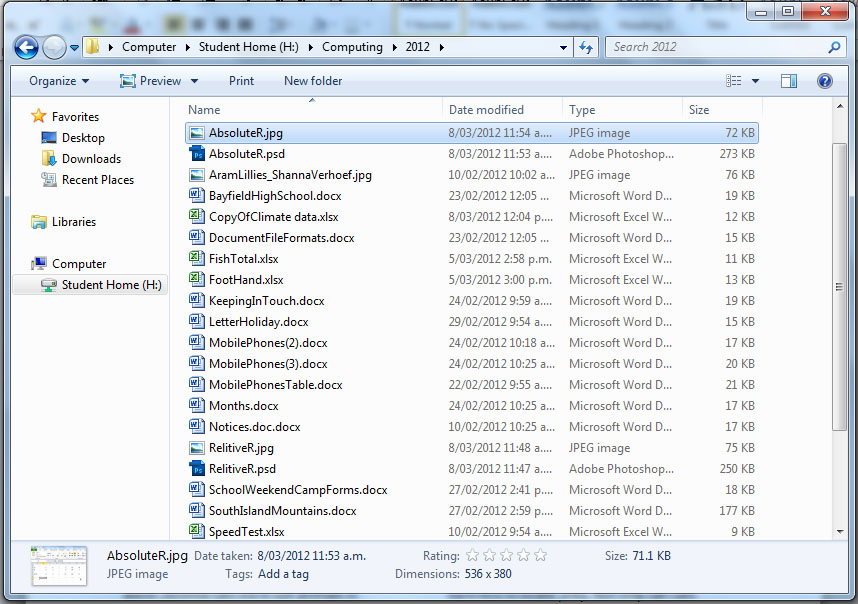
Another way of naming your files is having underscores instead of spaces.
If you use spaces in the file name then if the file is used on the internet, the computer may change the name. This is why you shouldn't use spaces in the file name.
Another thing you should try not to do is use special characters such as !#$%? except for underscores and dashes.
However you organise your file you should always be consistent.
Thursday, March 8, 2012
Exel - Cell References and Copying to Word
Relative Reference - This means that when you reference a cell in a formula and you use the formula for different cells, the cells in the formula will move across and down depending on where the cell is that you chose to use.


Absolute Reference - This is used in a formula to set a cell so when the formula is used in different cells, the cell you have set will stay the same. You do this by adding '$' before the letter or number reference for the cell, depending on what you want to stay the same. eg =B2+$A$8 A8 will stay in the formula even when you change the cell.

Copying to Word - If you copy and paste information from excel to word you will have many different paste options. One of them is 'linking'. This means that if you change something on the original excel document, the information will also change on the word document.
Wednesday, March 7, 2012
Tools in Word
- Quick Styles - This is used when you are formatting your text and you have different formats such as font, size and spacing for different parts of your text (e.g. title, subheadings). It is a lot easier to make the format you would like to use then save it as a quick style so you can reuse it later in the text. It is easier to use this than to try remember spacing or font sizes each time when making a new heading.
- Paragraph and Line Spacing - You can use line spacing to spread out your text more so it is easier to read. Paragraph spacing is used to separate paragraphs instead of using double 'enters'. You can do this by right clicking the text style at the top of the page and going to 'modify'. You can then go to 'paragraphs' and edit the size of the gap before or after the paragraph. If you with to make a new line without getting a paragraph gap, use 'shift, enter' instead of just 'enter'.
- Tables - Tables are a useful way to display information. To make them, you go to 'insert', then to 'table'. You can then pick how many columns and rows you want. When using tables you should always adjust the cell margins so the text doesn't look too crammed up. In the table you can merge cells and right, left and centre align text.
- Tabs - Tabs can be useful to show information. To make a tab, simply turn the rulers on then click on the ruler where you would like a tab. With a tab you can left, right and centre align text as well as aligning decimals.
Thursday, February 23, 2012
Document File Formats
- · docx – made in modern (e.g. 2010) Microsoft Word programs. Old Microsoft word programs cannot read them without a convertor.
- · .doc – made in older Microsoft Word programs. Can also be read in modern Word.
- · .pdf – Stands for ‘Portable Display File’. Can be read on any computer. Can not be edited.
- · .rtf – Stands for ‘Rich Text Format’. Most Word processes are able to read them.
- · .odt – Made in Open Office.
Thursday, February 9, 2012
Test
Appropriate use in Context

Working between school and home
If you are working on something at school, such as a project, and you want to take it home to work on it or vice versa, then you need a way of transporting it. Some popular ways which people use are USB, e mailing it to yourself and other storage devices such as an i pod or hard drive. E mailing it to yourself is a particularly good way because then you can access it from any computer and you don't need to remember to take any type of storage holder. It also means that you have your project backed up in case something happens to the original.
When you produce some work, you need to be careful that the you use appropriate text and photos for the job. For example, if you are doing a project in school you shouldn't include anything rude or graphic because it wouldn't be appropriate, but if you did the same project at university then it would be a more appropriate place to use graphic images. At school there is a blocking system they use which is called watchdog. Watchdog blocks websites which are not appropriate for schools. In google settings you can turn on safe search which would block inappropriate images. You can set your safe search to off, moderate or strict.
Below is a screenshot of what would come up if you tried to get on a website blocked by watchdog.

Security
When you are finished on a computer you must be careful to log out properly, particularly if you are not working on your own computer. If you don't then anyone could go though your folders and delete your work. You should also be careful not to let anyone know your password because then they could log on anytime. If people do see your password then all you need to do is change it and not let anyone see your new password. If you are at school you would need to talk to the appropriate teacher to get it changed.
If you are working on something at school, such as a project, and you want to take it home to work on it or vice versa, then you need a way of transporting it. Some popular ways which people use are USB, e mailing it to yourself and other storage devices such as an i pod or hard drive. E mailing it to yourself is a particularly good way because then you can access it from any computer and you don't need to remember to take any type of storage holder. It also means that you have your project backed up in case something happens to the original.
Thursday, May 19, 2011
Follow the Rabbit Proof Fence
By Doris Pilkington
"Those cruel and murderous men came ashore and stole Aborigional women and kept them on board their ships as sexual slaves, then murdered them and tossed their bodies into the ocean when their services were no longer required." pg 4
This quote is said by the chief of the Aborigional tribe. It shows how little respect the Europeans whalers had for them and how they didn't think of them as equals, but as slaves. The Aborigional tribe didn't trust European people anymore because they had only met cruel men with no conscience. The way the chief says it suggests they were ruthless and wouldn't reason with them.
"Those cruel and murderous men came ashore and stole Aborigional women and kept them on board their ships as sexual slaves, then murdered them and tossed their bodies into the ocean when their services were no longer required." pg 4
This quote is said by the chief of the Aborigional tribe. It shows how little respect the Europeans whalers had for them and how they didn't think of them as equals, but as slaves. The Aborigional tribe didn't trust European people anymore because they had only met cruel men with no conscience. The way the chief says it suggests they were ruthless and wouldn't reason with them.
Subscribe to:
Posts (Atom)